
Overlay Digital Clock is a sleek, transparent desktop application that helps you stay on time without occupying valuable screen space. It floats seamlessly above all other windows, allowing you to monitor the time effortlessly while you work. Balancing functionality with subtle design, it offers key features including current time, date display, and adjustable transparency settings. Ideal for users who prefer a discreet yet constantly visible timepiece.
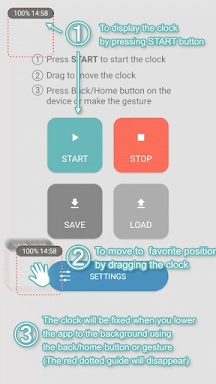
- Customizable Placement: Move the clock freely by dragging it, so you can position it exactly where it suits your workflow.
- Built-in Timer: The integrated timer stops automatically after it completes, making it simple to track time and maintain daily productivity.
- Battery Status Display: Check your remaining battery level directly through the app, so you're never caught off guard by a low battery.
- Save Clock Location: Store your preferred clock position for quick access and a consistent viewing experience every time.
- Experiment with Layouts: Try dragging the clock to various screen locations to discover the most comfortable arrangement.
- Boost Focus with Timers: Use the timer to set limits for tasks or breaks, helping you stay productive and organized.
- Watch Battery Levels: Frequently check the battery indicator to ensure your device has sufficient power for uninterrupted app use.
Download and Install: Get Overlay Digital Clock from your device’s app store or the official website.
Launch the App: Open the app to see the clock appear automatically on your desktop.
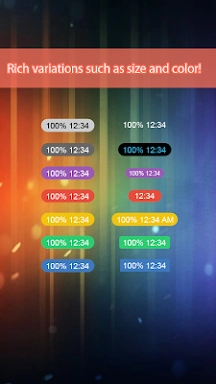
Customize Settings: Go to settings to modify the clock’s look—such as font style, color, and transparency level.
Reposition the Clock: Drag the clock to any on-screen location where it remains clearly visible.
Enable Always on Top: Make sure the "Always on Top" option is turned on so the clock stays above other applications.
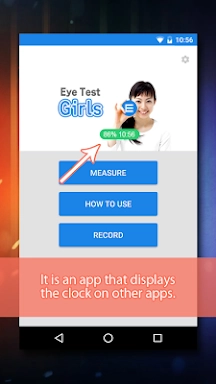
Check the Time: Easily view the current time with a quick glance, without switching apps or devices.
Adjust Preferences: Revisit settings anytime to update the clock’s appearance or placement.
Troubleshooting: If the clock doesn’t display or acts unexpectedly, refer to the app’s help guide or contact customer support.
"Clair Obscur: Expedition 33 Hits 1 Million Sales in 3 Days"
Top 10 Liam Neeson Films Ranked
Ragnarok V: Returns Beginner's Guide - Classes, Controls, Quests, Gameplay Explained
Roblox Deep Descent: January 2025 Codes Revealed
Expedition 33 Patch Fixes Soft-Lock Bug
Bitlife: How to Complete the Renaissance Challenge
How to Feed Villagers in Necesse
Bahiti Hero Guide: Mastering the Epic Marksman in Whiteout Survival

Methods: Complete Edition brings the breezy detective visual novel together in one release, out now
Sep 26,2026

Piece with a slant Crossword Clue - Try Hard Guides
Sep 26,2026

Octopath Traveler 3 is Actually Octopath Traveler 0 Launching on Switch 2
Sep 25,2026

How Animal Crossing Sparked the Cottagecore Boom
Sep 25,2026

"Drop Zone Galaxy: New Physics-Based Game Launches on Android"
Sep 22,2026
 Category
 Download











Discover the best beauty apps to enhance your makeup and skincare routine! This curated collection features top-rated apps like Magic Beauty Makeup Camera, Beauty Plus Princess Camera, Makeup Ideas, FOREO (for skincare devices), Easy hairstyles step by step, FaceTone, SnapArt, Makeup Photo Editor, Beauty Make Up Photo Editor, and Makeup Camera: Selfie Editor & Beauty Makeup. Transform your selfies, find makeup inspiration, and explore innovative skincare tools – all in one place. Find the perfect app to achieve your desired look and elevate your beauty game today!
FaceTone
Makeup Camera: Selfie Editor & Beauty Makeup
Beauty Plus Princess Camera
SnapArt Pro Ai Photo Editor
Makeup Ideas
FOREO For You
Makeup Photo Editor